How to choose a CPU cooler that fits your case and RAM
Check the exact mounting kit, installed cooler height, RAM clearance and radiator position before buying. Socket support is one check; it does not prove the cooler fits the complete PC or can meet your workload.
First check whether the CPU includes a cooler
Read the exact boxed CPU specification and the seller’s package contents. A processor photograph is not evidence that a cooler is included. AMD’s Ryzen 7 9800X3D, boxed part 100-100001084WOF, lists no included thermal solution. It needs a separately planned cooler; AMD also recommends liquid cooling for optimal performance.
That example is not a rule for every Ryzen processor. Keep the CPU, cooler and any mounting kit as separate items in the purchase plan. If you already own a cooler, record its exact model, brackets and condition before counting it as a reusable part.
Match the socket and the actual mounting hardware
Find the cooler manufacturer’s support for the selected socket and motherboard. Then check whether the needed brackets are included in the box you will receive or require a separate kit. A compatible socket name does not establish that a used cooler still has the correct screws, backplate or spacers.
Follow the exact cooler manual rather than borrowing an installation sequence from a similar model. ARCTIC, for example, provides different socket paths and wiring choices for the Liquid Freezer III 360. Its motherboard-compatibility link is another check, not permission to assume every board fits. Do not alter mounting hardware or improvise missing pieces.
For an air cooler, use its installed height
Compare the manufacturer’s installed height with the case’s documented CPU-cooler allowance. Include the fans in the intended position. The standard Noctua NH-D15 G2 is specified at 168 mm with its fans; it is also 168 mm without them. Removing a fan therefore does not make this model’s heatsink shorter.
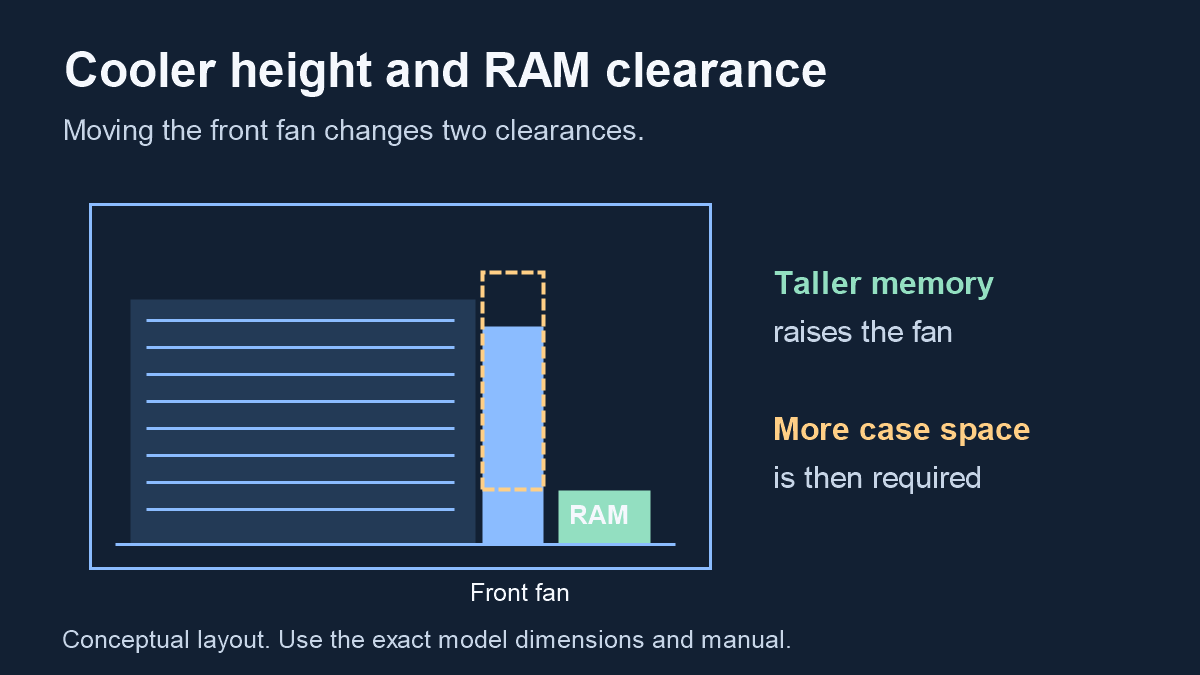
Now check the memory underneath an overhanging fan. Noctua specifies 32 mm RAM clearance for the standard dual-fan arrangement. Raising that front fan can clear taller memory but also increases the case space needed. A different cooler, orientation or fan can require a different calculation.
A worked example: taller RAM changes the answer
Suppose your exact RAM documentation lists 40 mm height and you are considering the NH-D15 G2 in that standard dual-fan arrangement. Raising the fan by the 8 mm difference gives an illustrative required height of 176 mm: 168 + (40 − 32). If your case’s documented allowance is 175 mm for that layout, this example fails that height comparison.
The RAM and case values in this example are hypothetical inputs, not specifications for a hidden product recommendation. This is not a universal formula for other coolers. A result below the case limit would pass only this height calculation; motherboard layout and installation access still need checking. Do not add an invented universal safety margin or use a realistic-looking 3D scene as the measurement.
| Input | Value | Evidence status |
|---|---|---|
| Standard cooler height | 168 mm | Noctua specification |
| Standard dual-fan RAM clearance | 32 mm | Noctua documentation |
| Example RAM height | 40 mm | Hypothetical reader input |
| Fan rise | 8 mm | 40 − 32; calculated |
| Example required height | 176 mm | 168 + 8; calculated |
| Example case allowance | 175 mm | Hypothetical reader input |
For an AIO, check the full radiator and fan assembly
“360 mm” identifies a radiator class, not every outside dimension. ARCTIC’s Liquid Freezer III 360 drawing identifies a 38 mm radiator thickness and a 66 mm radiator-and-fan assembly envelope. Use the full drawing and mounting position instead of assuming the radiator label describes the space the complete assembly occupies.
The case’s top and front mounts can have different restrictions. Fractal’s original North support page, for example, lists a 122 mm top-radiator width limit and a conditional 35 mm motherboard-component height for top mounting. Those are original-North conditions, not a verdict for North XL or an arbitrary 360 mm cooler.
Record the radiator location and the components near it: RAM, motherboard heatsinks, GPU, cables and drive mounts. Confirm the block, tubes and access for connectors as well. If the source gives only a radiator class, leave the remaining dimensions unresolved and consult the exact manuals.
Keep physical fit separate from cooling performance
A cooler can mount correctly and still be the wrong choice for your workload or noise preference. Look for testing that identifies the same CPU, cooler configuration, power settings and test conditions. Do not turn a matching socket or a cooler’s marketing wattage into a promise of a particular temperature.
MSI’s buying guide separates mounting and clearance from thermal requirements. Use that distinction without treating its broad product classes as measured recommendations for your build. This guide provides no temperature, noise or FPS comparison between the example products. Choose between air and liquid cooling only after the fit checks and relevant workload evidence are understood.
Save the cooling decision with the rest of the build
Keep one record containing CPU model, cooler model/revision, socket kit, RAM height, installed height or radiator envelope, case location, required headers and source links. Add separate tasks for unanswered dimensions and missing hardware. A new case, RAM kit or radiator position should trigger another check.
Before ordering, include cooling, any separately required mounting kit and the actual delivery cost in the purchase plan. Check the manufacturer’s package list before buying duplicate fans or thermal compound. When evidence remains missing, keep a visible “needs verification” task rather than calling the PC fully compatible.
- Exact CPU and cooler identities recorded
- Correct socket mounting kit present or separately budgeted
- Installed height and RAM clearance checked together, or full AIO envelope and location checked
- Exact motherboard and case documentation saved
- Headers, cables and included accessories checked
- Cooling suitability and remaining unknowns kept separate from fit
Apply this to your PC
Sources
- AMD — Ryzen 7 9800X3D desktop processor specifications
Exact boxed part 100-100001084WOF has no included thermal solution; AMD recommends liquid cooling for optimal performance. A manufacturer recommendation is not a measured result for every cooler, a requirement for a particular radiator size or proof of thermal adequacy. Source inspected 2026-10-16.
- ARCTIC — Liquid Freezer III 360 installation manual
Exact cooler socket-specific mounting paths, motherboard compatibility link, all-in-one or individual PWM wiring and radiator installation guidance. Do not transfer instructions to Liquid Freezer III Pro, another size or another revision. The exact motherboard manual still governs header ratings and controls. Source inspected 2026-10-16.
- Noctua — NH-D15 G2 specifications
Standard NH-D15 G2: 168 mm published height with and without fans; supplied mounting system and thermal compound. Do not substitute NH-D15, HBC, LBC or a different mounting revision. Listed socket support does not certify the complete installed layout. Source inspected 2026-10-16.
- Noctua — CPU cooler RAM clearance
NH-D15 G2 standard dual-fan RAM clearance is 32 mm; raising an overhanging front fan increases the required case clearance. The worked arithmetic here uses that documented configuration. It is not a universal formula for all coolers or a measurement of the reader’s case. Source inspected 2026-10-16.
- ARCTIC — Liquid Freezer III 360 two-dimensional drawing
ACFRE00136A drawing labels radiator thickness 38 mm and radiator/fan assembly envelope 66 mm. Drawing revision January 31, 2024. An occupied envelope is more useful than a nominal radiator class. Drawing length and a separate specification sheet differ; no disputed length is used to certify fit. Source inspected 2026-10-16.
- Fractal Design — Original North radiator compatibility
Original North: top radiator width limit 122 mm, front width limit 151 mm and conditional 35 mm motherboard-component height for a top radiator. Not North XL, North XL RC or every radiator stack. These conditional dimensions do not prove complete compatibility of a named cooler. Source inspected 2026-10-16.
- MSI — How to choose a CPU cooler
Manufacturer explanation separating socket mounting, case height, RAM clearance, radiator fit and workload-related thermal needs. Published September 23, 2026. Manufacturer marketing recommendations and generic radiator-thickness ranges are not adopted as universal limits or benchmark results. Source inspected 2026-10-16.
Update record
2026-10-16: New source-linked cooling guide with an explicitly hypothetical RAM-height example.